Reporting Cash Register to The Tax Agency
How to report a cash register
If you are planning to have a cash register then you must report this to the Swedish Tax Agency. The easiest way to do this is via the Cash Register e-service. Here you are able to certify the cash register, modify information and report any malfunctions of the cash register. Also agents such as distributors are able to make reports to the Tax Agency.
This is what happens when you have reported the cash register
When you have reported the cash register and the control unit you will receive confirmation of this after about one week.
A certificate of registration is sent out about one month after the notification. You also receive labels (stickers) that show the identification number for the cash register and the control unit respectively. Stick the labels securely and visibly on the respective unit.
If you have a cash register of such a type that it is not possible to secure the labels on the cash register/control unit then you should keep the labels next to where the cash register is actually used. You should also have a list of which units correspond to the respective label. You may start using the cash register as soon as it is reported to the Swedish Tax Agency; in other words already before you have obtained the labels.
Reporting changes
If your circumstances have changed you must report this to the Swedish Tax Agency within two weeks of such a change. Examples of such change of circumstances may be the procurement of another cash register, the replacement of the existing one, the sale of the cash register or a change of address. When you report a change of circumstances, in some cases it may arise that you receive labels (stickers) marked xxxxxxx. In that case you should retain the old label since it continues to apply.
Malfunction reports and operating failures
In case of an operating failure (outage), it is important that you report the problem to the Swedish Tax Agency as soon as possible. This applies, above all, to lasting stoppages. An operating failure that lasts some time may be one that requires repair and which cannot be carried out during the sales day. You do not need to report the malfunction of the cash register owing to a power cut.
In the event of an operating failure (outage) the fundamental requirement applies that all sales shall be registered in a cash register. If you continue to sell nevertheless this means that you may be charged an inspection fee owing to the sales not having been registered in a cash register. Where the operating failure has arisen owing to circumstances that lie beyond your control, then this is something that the Tax Agency shall pay special attention to, within the framework of the provisions relating to complete or partial exemption from the inspection fee. Through your malfunction report we acquire knowledge of the operating stoppage and we can subsequently assess whether it was excusable that you continued to sell without registering the sales transactions in a cash register.
If you are unable to register the sale transactions in the cash register, for example owing to an operating failure (outage), you may continue to sell without contravening the cash register regulations by producing a cash invoice for each sale transaction undertaken.
If your business is of such a kind that you are unable to use cash invoices, you must document the sales in some other appropriate way. In accordance with the provisions of the Accounting Act and the standards of the Swedish Accounting Standards Board, it is sufficient that the sale transaction is noted in a cash book or cash report. In such cases you should not register the sales in the cash register afterwards. You can use a receipt block in order to best document the sales and to be able to offer receipts to the customers.
It is important, at the earliest opportunity, that you take reasonable steps to have your cash register repaired or replaced as soon as possible. The Swedish Tax Agency’s scope for not charging an inspection fee in these situations mainly concerns cases where the operating failure is of a temporary nature and is due to circumstances that are outside your own control.
Sale or scrapping of the cash register
When you no longer use your cash register or control unit these shall be deregistered. The easiest way to do this is via the e-service Cash Register.
A control unit that is no longer used shall be kept securely for at least 12 months after its use has been discontinued. If the control unit is sold together with the cash register, the previous owner is responsible for the information being made available to the Tax Agency in the case of an inspection.
E-Service
The Cash Register service enables you to report the cash register, modify information and report any malfunctions of the cash register.
Register a new cash register
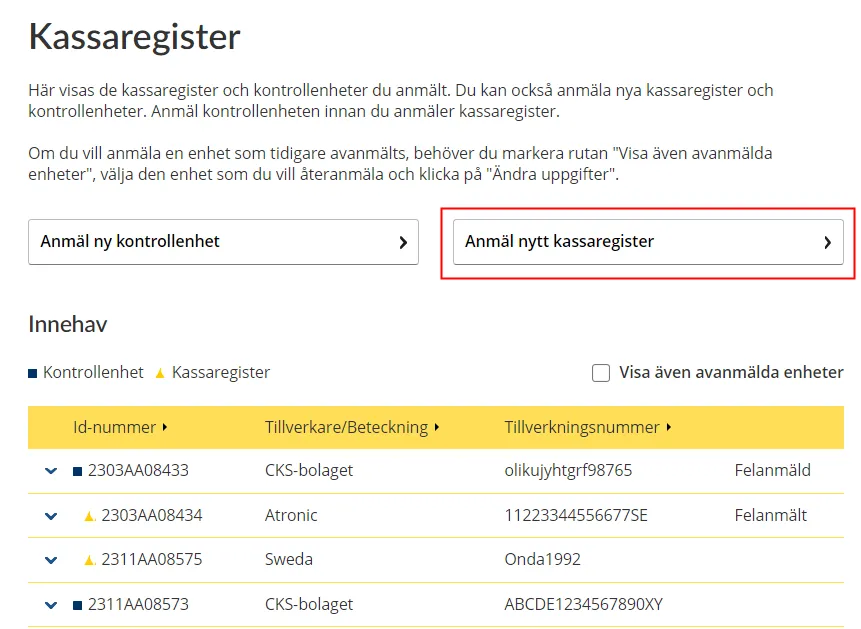
Click the button “Anmäl nytt kassaregister” (“Register a new cash register”). A form will open.
Fill in information
The first step is to fill in information about the cash register. All the information except for the house number is required. To state the address, begin by filling in the “Postnummer” (“Postcode”) field. Then click the link “Hitta adresser” (“Find address”) in the field next to it. This will open the “Gata” (“Street) field and you can select the street from the list that is shown when you place the cursor in the field. Once you have selected the street, the “Nummer” (“Number”) field will open and you can select a number from the list shown.
Fill in the form and click the “Nästa” (“Next”) button. If you want to cancel, click the “Avbryt” (“Cancel”) button.
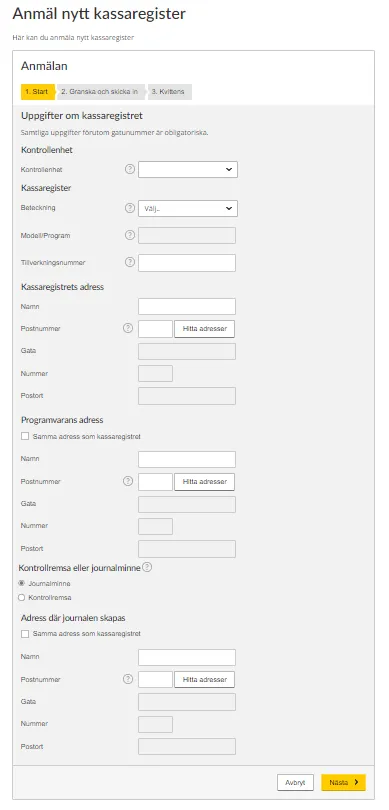
Explanations of the words in the form:
- Uppgifter om kassaregistret (Information about the cash register)
- Kassaregister (Cash register)
- Modell/program (Model/software)
- Tillverkningsnummer (Serial number)
- Kassaregistrets adress (Cash register’s address)
- Namn (Name)
- Postnummer (Postcode)
- Hitta adresser (Find address)
- Gata (Street)
- Nummer (Number)
- Postort (City/town)
- Programvarans adress (Software’s address)
- Samma adress som kassaregistret (Same address as the cash register)
- Kontrollremsa eller journalminne (Audit strip or journal memory)
- Adress där journalen skapas (Address where journal memory is generated)
Help texts:
Each encircled question mark on the form is a help text button. Click it and the relevant help text will be shown.
- Kontrollenhet (Control unit) – Select an existing control unit at the company, which the cash register is to be linked to.
- Beteckning (Designation) – This information can be found in the documentation for the cash register. What models and software are available to select depends on what designation was selected.
- Modell/program (Model/software) – Only manufacturer-declared cash registers can be selected. If your model is not included, it is not a manufacturer-declared cash register.
- Tillverkningsnummer (Serial number) – Every cash register has a unique serial number. This means that two or more cash registers with the same designation and model/software cannot have the same serial number.
- Postnummer (Postcode) – Begin by filling in the postcode. Then you can select the street and house number.
- Kontrollremsa eller journalminne (Audit strip or journal memory) – An audit strip is a a form of continuous documentation on paper of registrations in the cash register. If the cash register has an audit strip, select audit strip. No further selection will need to be made. Journal memory, often called an e-journal, is an electronic form of continuous documentation of registrations in the cash register. If the cash register uses an e-journal, select this option and specify the address where the journal memory is generated.
Fill in the form and click the “Nästa” (“Next”) button.
If you want to cancel, click the “Avbryt” (“Cancel”) button.
Review and Submit.
When you click the “Nästa” (“Next”) button, you will be taken to the next step, in which you review and submit the information. Review the information. If everything is correct, click the “Skicka in” (“Submit”) button.
If you need to change any item of information, click the “Föregående” (“Previous”) button. If you want to cancel, click the “Avbryt” (“Cancel”) button.
Receipt
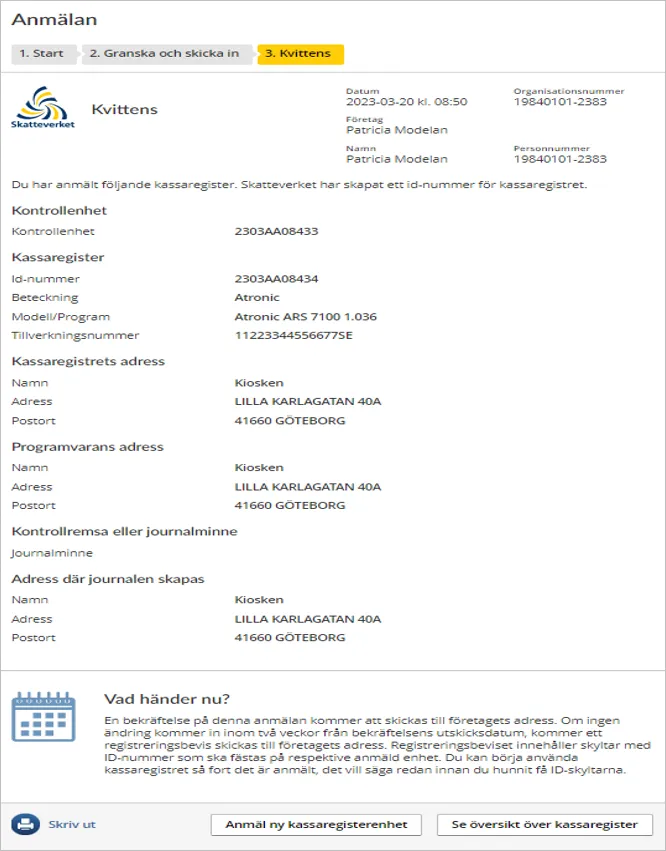
In the final step you are shown the receipt, which is a summary of all the information you have submitted and a confirmation that the Swedish Tax Agency has received your registration.
What happens next?
Confirmation of your registration will sent to the company’s address.
If we receive no request for changes within two weeks of the date on which the confirmation was sent, a registration certificate will be sent to the company’s address. The registration certificate includes labels with ID numbers that have to be affixed to the respective registered unit.
You can begin using the cash register as soon as it has been registered, i.e. even before you have received the ID labels.
Click “Skriv ut” (“Print”) if you want to print out the receipt.
Click the button “Anmäl kassaregisterenhet till denna kontrollenhet” (“Register a cash register unit for this control unit”) if you want to register a cash register unit.
Click the button “Se översikt över kassaregister” (“See overview of cash registers”) to return to the overview that shows registered cash registers.